
A platform full of data that couldn't tell you what to do.
Scoir is a college and career readiness platform used by thousands of high schools. Students discover colleges, build lists, request recommendations, and send documents. Counselors sit on top of all of it. But for a counselor, the platform behaved like a library, not a workflow. It could show everything about a student except what they most needed to act on.
That gap collides with a hard number. The national student-to-counselor ratio is 372:1 (ASCA, 2024–25), well above the recommended 250:1. At that caseload, checking in with each student individually isn't a plan. It's the thing that never happens. So counselors coped the way busy people do: spreadsheets, email blasts, printed checklists. The actual guidance work lived outside the product built to support it. Students would log into a genuinely capable platform and find no answer to the only question that mattered: what should I be doing right now?
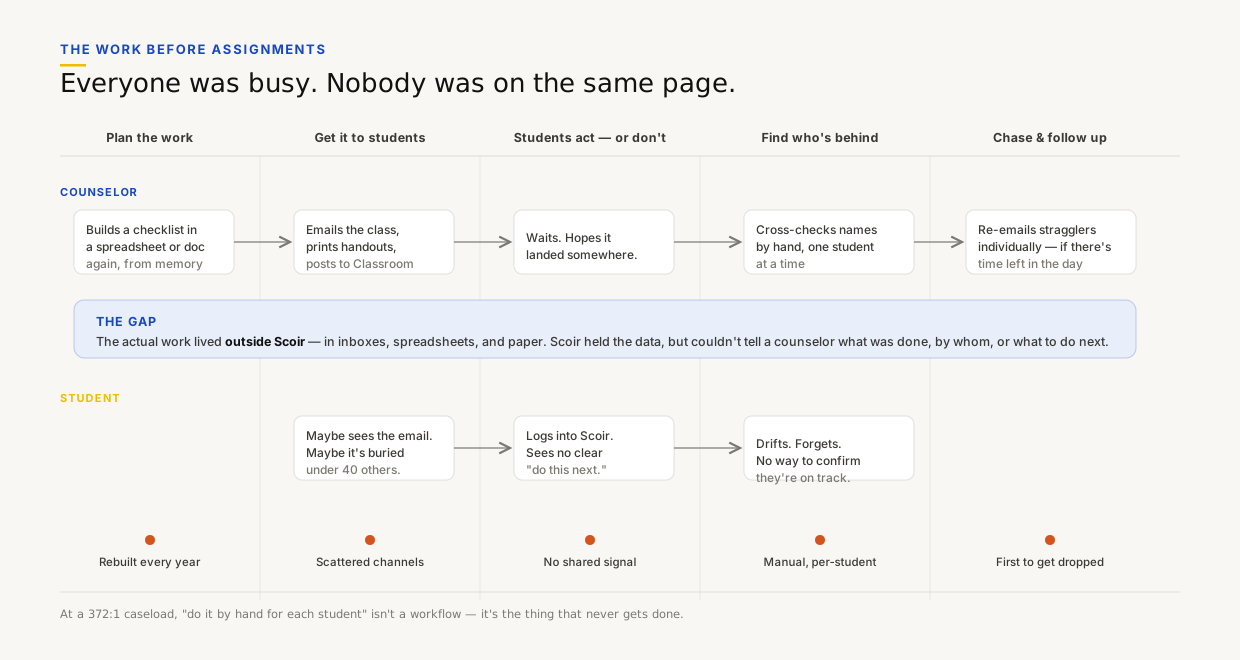
The before: mapping where the work was actually happening (everywhere but Scoir) and where counselors and students lost sight of each other
Two users, one feature, opposite needs.
Before drawing anything, I spent time understanding how counselors actually drive a caseload. The grade-level checklists they rebuild every fall, the reminder emails, the spreadsheet columns standing in for a status field. One word came up over and over: track. They didn't need a fancier way to communicate. They needed to know where everyone was.
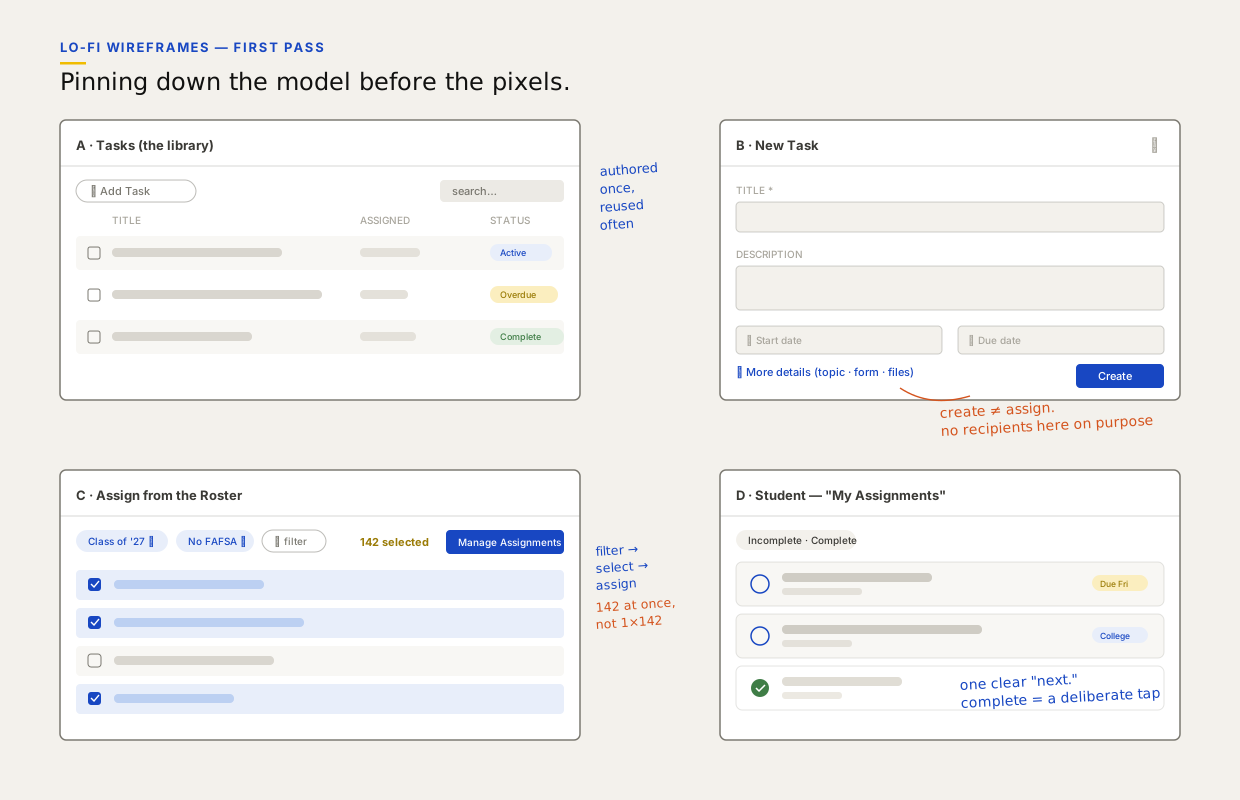
First-pass wireframes. The annotations are the actual arguments — "create ≠ assign," "142 at once, not 1×142," "one clear next."
A task is a thing you make. Assigning is a thing you do to it.
The fastest version of this feature is "write a note, pick some students, hit send." Engineering could have shipped it in a sprint, and there was real pressure to. I argued against it, because if creating and assigning are the same action, every task is single-use — and every September becomes a from-scratch rebuild of work the counselor already did last year.
So I split them. A Task is authored once into a school-wide library with no audience attached. Assigning is a separate action that pushes that task to any number of recipients, any number of times: a filtered cohort, a single student, a set of parents. Making that case meant walking product and engineering through a roadmap that didn't exist yet — the version of Scoir two years out, where this seam is what makes the next two features cheap. I got the extra time. It was the most consequential call I made at Scoir.
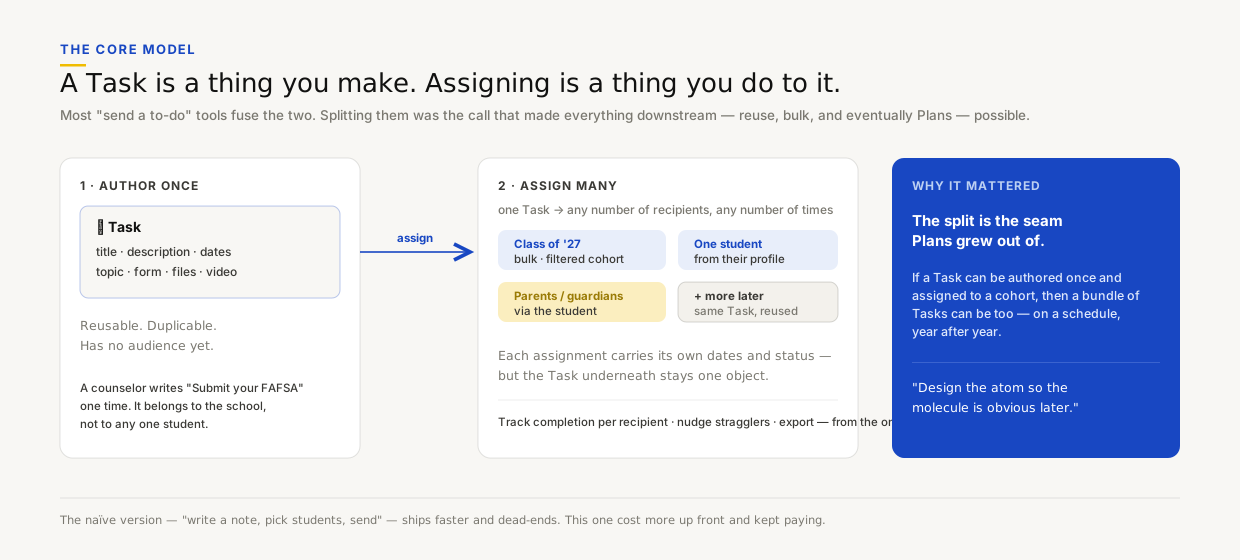
The core model. Authoring and assigning are deliberately separate verbs. The architecture decision the rest of the product would lean on.
"Design the atom so the molecule is obvious later." The quick version ships a week sooner and dead-ends. This one kept paying. It's the exact seam Plans grew out of.
Built around the roster they already lived in.
The counselor side had to feel like power tools without feeling like a database. Four things carried it.


Authoring a task. The first screen stays light; everything optional lives behind "More details."


Assigning from the roster the counselor already knows — filter, select, assign. Managing recipients after the fact.


Filter by status, export a view, send a reminder to everyone still outstanding. One motion.
For the student, one clear next thing.
Everything on the counselor side optimizes for scale. The student side optimizes for the opposite: a single, unmissable answer to "what now?" I carved out a My Assignments space on the dashboard. Incomplete by default, each task shows its due date, title, and an optional topic tag, with completed work one toggle away.
Completion is a deliberate tap, never inferred. Even after a student submits an attached form, they come back and mark the task done themselves. It would have been easy to auto-complete on form submission. I chose not to. The status is the student's to own, and that keeps the dashboard honest.


The student's view. Due date, title, topic. The full detail when the counselor attached a video, PDF, or form.
Underneath both views is a shared vocabulary. Five status words (Pending, Active, Overdue, Complete, Archived) had to read correctly from three different seats: a counselor scanning hundreds of students, a student getting a nudge, and reporting that still counts archived work so history isn't lost.
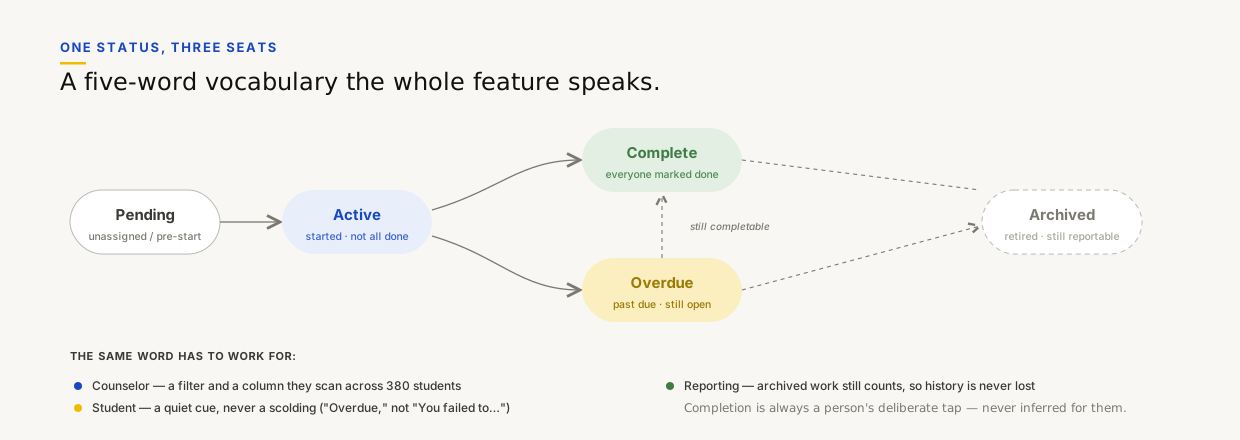
One status model, three audiences. The wording was a design decision: "Overdue," not "You failed to…"
The last piece was the quietest and nearly the most important: notifications. Assign five tasks to a junior class and the naive system fires five emails to three hundred teenagers who promptly mute the sender, taking the feature down with them. We made the cadence a product decision: new assignments batch into a single hourly digest, future-dated tasks notify at 8am local on the day they open, and reminders send immediately because they carry a counselor's intent.
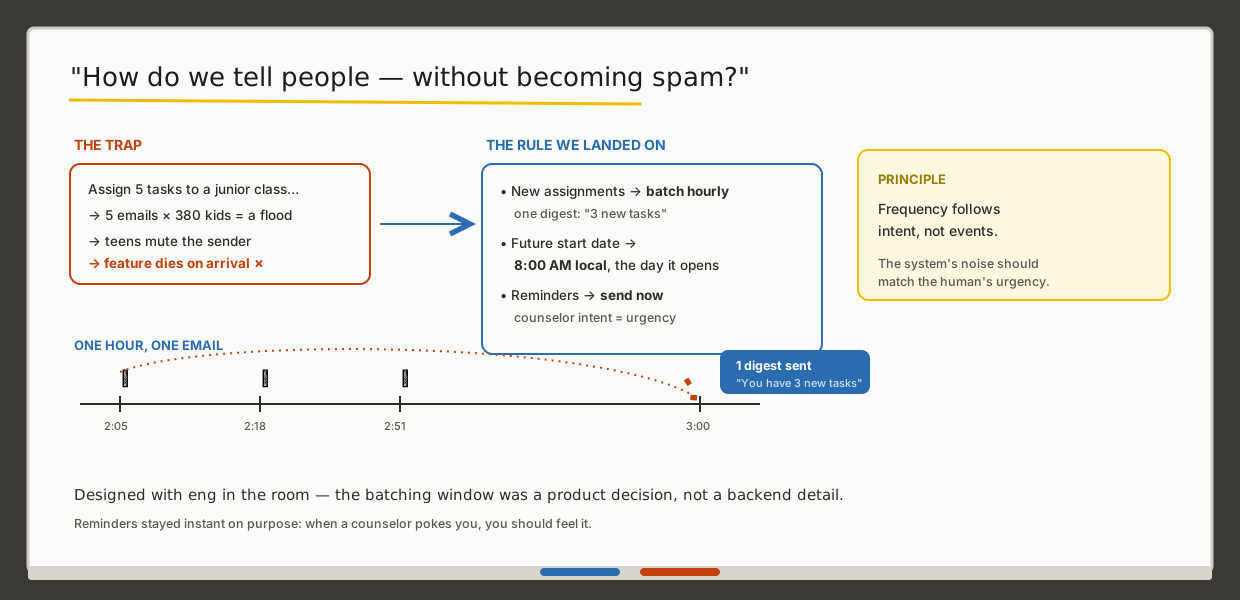
Working the notification problem out with engineering. The principle: frequency follows intent, not events.
The same task, every August — until it wasn't.
Once counselors were authoring tasks, a pattern showed up within weeks: they were rebuilding the same sets every year. The junior brag-sheet push. The senior FAFSA sequence. The freshman onboarding checklist. The work was recurring. The tool treated each task as a one-off.
Because a task was already something you author once and assign many times, the next move was almost drawn for me. Bundle tasks into a Plan that publishes to a cohort, auto-assigns the whole set, and rolls over to next year's class untouched. Then Scoir-Created Plans: expert-built, fully customizable templates, so a counselor starts from a proven sequence instead of a blank screen.
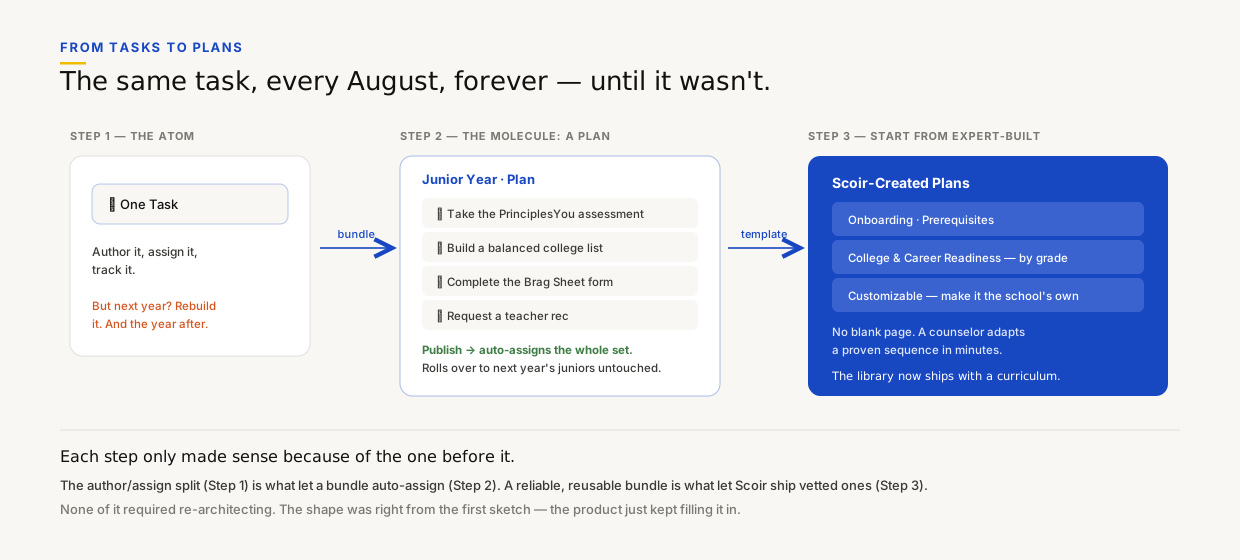
Tasks → Plans → Scoir-built templates. Each step only made sense because of the one before it.


Plans in the product and the Scoir-Created Plan templates that followed. The feature grown up.
It changed what Scoir is for a counselor.
Before Assignments, Scoir was a place a counselor went to look things up. After, it became a place they run their year from. That's a change in what the product is, not a feature added to it — and it moved Scoir from a reference tool toward a workflow tool, which is a different company to sell.
The clearest signal isn't a usage number. It's that the model held. The author/assign split shipped once and carried two further product generations — Plans, then Scoir-Created Plans — without a rewrite, which is the return on the weeks I asked for up front. The components it introduced (status pills, the assignment drawer, roster bulk-actions, progressive-disclosure forms) became shared platform patterns and shipped in features I had nothing to do with. That's the part I'm proudest of: the leverage outlived my involvement.